适用场景
hCaptcha 可用于登录、注册、发送验证码、提交表单等容易被自动化程序滥用的入口。
- 前端展示 hCaptcha 组件并取得一次性
token。 - 后端使用
Secret调用 hCaptchasiteverify接口验证 token。 - 只有校验通过后,才继续执行受保护的业务。
创建 hCaptcha 凭据
注册并进入控制台
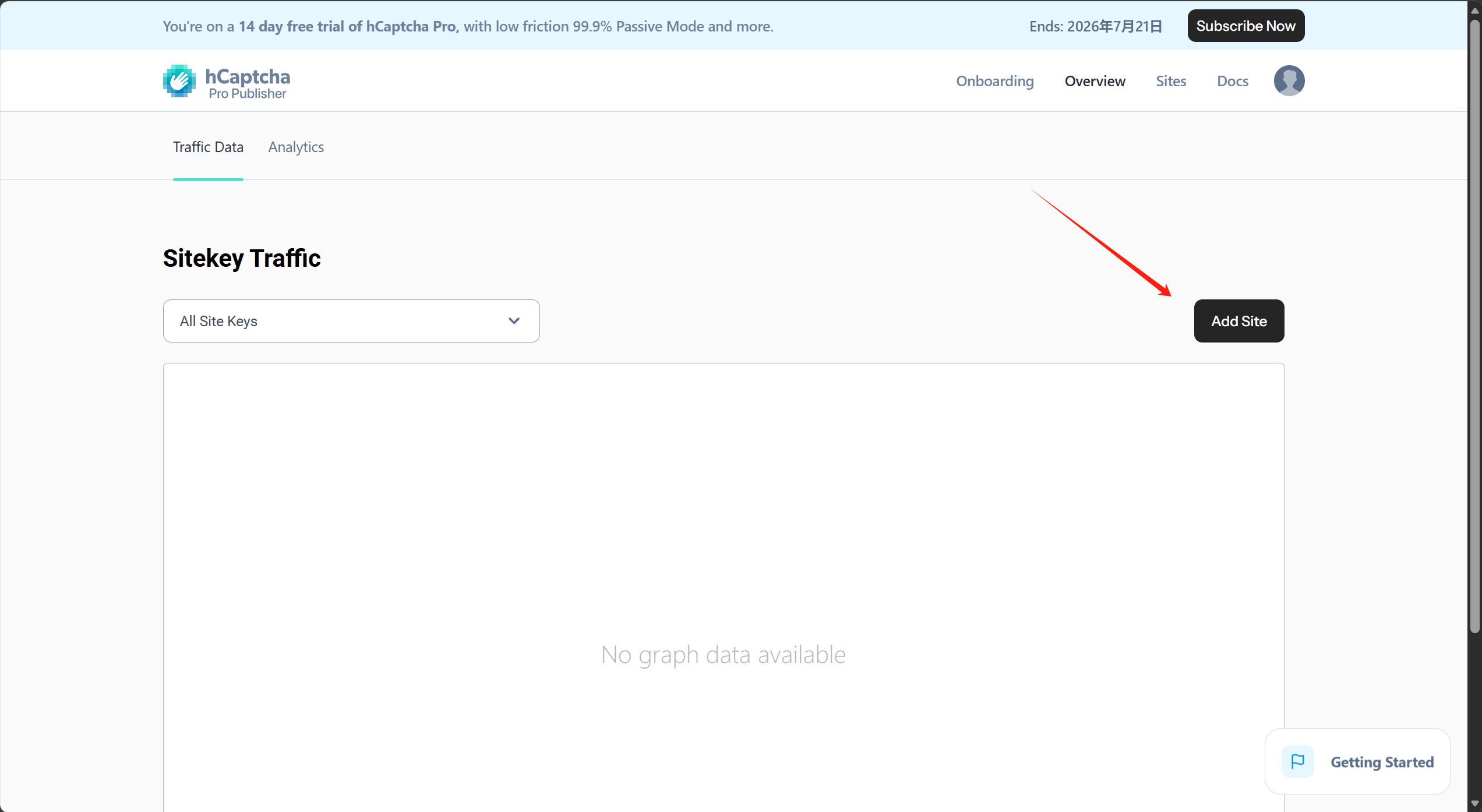
打开 hCaptcha Dashboard 完成注册。当前控制台可能会为新账号自动开启 14 天 Pro 试用,具体套餐状态和到期时间以控制台顶部提示为准。
首次进入 Onboarding 页面时,控制台会创建一个 Sitekey,并提供生成 Secret 的操作。
Sitekey是前端公开标识;Secret是后端校验凭据,不能放在前端代码、公开文档或代码仓库中。
环境变量统一使用占位符:
HCAPTCHA_SITE_KEY=<HCAPTCHA_SITE_KEY>
HCAPTCHA_SECRET_KEY=<HCAPTCHA_SECRET_KEY>
一个账号级 Secret 可以用于校验该账号下多个 Sitekey。后端校验时可以额外提交 sitekey,确保 token 属于预期站点。
创建 Site
进入 Overview 页面,点击 Add Site。

填写 Site 名称,例如 dev。Domains 是可选项,不填写也可以创建和使用 Sitekey;生产环境建议填写实际业务域名,缩小 Sitekey 的使用范围。

选择行为模式
行为模式可先保留控制台推荐的自动模式。Pro 试用期间可能显示 99.9% Passive;试用结束后可用模式以账号套餐和控制台实际配置为准。
确认配置后点击 Save。

前端接入
环境变量
前端只配置 Sitekey。
VITE_HCAPTCHA_SITE_KEY=<HCAPTCHA_SITE_KEY>
本地自动化测试可以使用 hCaptcha 官方测试 Sitekey:
VITE_HCAPTCHA_SITE_KEY=10000000-ffff-ffff-ffff-000000000001
Vue 3 组件示例
下面的组件动态加载 hCaptcha 脚本,通过 v-model 回传 token,并处理过期、错误、重置和组件卸载。
<template>
  <div class="hcaptcha-widget">
    <div v-if="missingSiteKey" class="hcaptcha-widget__message">
      {{ unavailableText }}
    </div>
    <div v-else ref="containerRef" class="hcaptcha-widget__container"></div>
  </div>
</template>

<script setup lang="ts">
import { computed, nextTick, onBeforeUnmount, onMounted, ref, watch } from 'vue'

defineOptions({ name: 'HCaptchaWidget' })

const HCAPTCHA_SCRIPT_ID = 'hcaptcha-script'
const HCAPTCHA_SCRIPT_SRC = 'https://js.hcaptcha.com/1/api.js?render=explicit'

interface HCaptchaRenderConfig {
  sitekey: string
  theme?: 'light' | 'dark'
  size?: 'normal' | 'compact' | 'invisible'
  hl?: string
  callback?: (token: string) => void
  'expired-callback'?: () => void
  'error-callback'?: (errorCode?: string) => void
}

interface HCaptchaClient {
  render(container: string | HTMLElement, options: HCaptchaRenderConfig): string
  reset(widgetId?: string): void
  remove(widgetId: string): void
}

declare global {
  interface Window {
    hcaptcha?: HCaptchaClient
  }
}

let hcaptchaLoadPromise: Promise<HCaptchaClient> | null = null

interface Props {
  modelValue?: string
  siteKey?: string
  theme?: 'light' | 'dark'
  size?: 'normal' | 'compact' | 'invisible'
  language?: string
  unavailableText?: string
}

const props = withDefaults(defineProps<Props>(), {
  modelValue: '',
  siteKey: '',
  theme: 'light',
  size: 'normal',
  language: 'zh-CN',
  unavailableText: 'hCaptcha site key is not configured'
})

const emit = defineEmits<{
  (event: 'update:modelValue', value: string): void
  (event: 'verified', value: string): void
  (event: 'expired'): void
  (event: 'error', value?: string): void
  (event: 'loaded'): void
}>()

const containerRef = ref<HTMLElement>()
const widgetId = ref('')
const currentSiteKey = computed(
  () => props.siteKey || import.meta.env.VITE_HCAPTCHA_SITE_KEY || ''
)
const missingSiteKey = computed(() => !currentSiteKey.value)

function loadHCaptcha(): Promise<HCaptchaClient> {
  if (window.hcaptcha) return Promise.resolve(window.hcaptcha)
  if (hcaptchaLoadPromise) return hcaptchaLoadPromise

  hcaptchaLoadPromise = new Promise((resolve, reject) => {
    const existingScript = document.getElementById(
      HCAPTCHA_SCRIPT_ID
    ) as HTMLScriptElement | null
    const script = existingScript || document.createElement('script')

    const handleLoad = () => {
      if (window.hcaptcha) {
        resolve(window.hcaptcha)
        return
      }
      hcaptchaLoadPromise = null
      reject(new Error('hCaptcha API is unavailable'))
    }

    const handleError = () => {
      hcaptchaLoadPromise = null
      reject(new Error('Failed to load hCaptcha script'))
    }

    script.addEventListener('load', handleLoad, { once: true })
    script.addEventListener('error', handleError, { once: true })

    if (!existingScript) {
      script.id = HCAPTCHA_SCRIPT_ID
      script.src = HCAPTCHA_SCRIPT_SRC
      script.async = true
      script.defer = true
      document.head.appendChild(script)
    }
  })

  return hcaptchaLoadPromise
}

function clearToken() {
  emit('update:modelValue', '')
}

function removeWidget() {
  if (!widgetId.value || !window.hcaptcha) return

  try {
    window.hcaptcha.remove(widgetId.value)
  } finally {
    widgetId.value = ''
  }
}

async function renderWidget() {
  if (missingSiteKey.value || !containerRef.value) return

  try {
    const hcaptcha = await loadHCaptcha()
    await nextTick()
    if (!containerRef.value) return

    removeWidget()
    widgetId.value = hcaptcha.render(containerRef.value, {
      sitekey: currentSiteKey.value,
      theme: props.theme,
      size: props.size,
      hl: props.language,
      callback: (token: string) => {
        emit('update:modelValue', token)
        emit('verified', token)
      },
      'expired-callback': () => {
        clearToken()
        emit('expired')
      },
      'error-callback': (errorCode?: string) => {
        clearToken()
        emit('error', errorCode)
      }
    })
    emit('loaded')
  } catch (error: any) {
    clearToken()
    emit('error', error?.message || 'Failed to load hCaptcha')
  }
}

function reset() {
  clearToken()
  if (widgetId.value && window.hcaptcha) {
    window.hcaptcha.reset(widgetId.value)
  }
}

onMounted(renderWidget)

onBeforeUnmount(() => {
  removeWidget()
  clearToken()
})

watch(
  () => [currentSiteKey.value, props.theme, props.size, props.language],
  () => {
    clearToken()
    renderWidget()
  }
)

defineExpose({ reset })
</script>
业务请求中把组件生成的 token 一并提交,例如字段名使用 hcaptchaToken。提交失败或 token 过期后,应调用组件暴露的 reset() 重新生成挑战。
后端校验
配置项
后端使用 Secret 调用 hCaptcha 校验接口,生产环境必须通过环境变量或配置中心注入真实值。
hcaptcha:
  enabled: ${HCAPTCHA_ENABLED:true}
  site-key: ${HCAPTCHA_SITE_KEY:<HCAPTCHA_SITE_KEY>}
  secret-key: ${HCAPTCHA_SECRET_KEY:<HCAPTCHA_SECRET_KEY>}
  verify-url: ${HCAPTCHA_VERIFY_URL:https://api.hcaptcha.com/siteverify}
  connect-timeout-millis: ${HCAPTCHA_CONNECT_TIMEOUT_MILLIS:3000}
  read-timeout-millis: ${HCAPTCHA_READ_TIMEOUT_MILLIS:5000}
本地测试可配合官方测试 Sitekey 使用测试 Secret:
HCAPTCHA_SITE_KEY=10000000-ffff-ffff-ffff-000000000001
HCAPTCHA_SECRET_KEY=0x0000000000000000000000000000000000000000
测试凭据只能用于开发和自动化测试,生产环境必须使用控制台生成的真实凭据。
Spring Boot 配置类
package com.example.captcha.config;

import lombok.Data;
import org.springframework.boot.context.properties.ConfigurationProperties;
import org.springframework.context.annotation.Configuration;

@Data
@Configuration
@ConfigurationProperties(prefix = "hcaptcha")
public class HCaptchaProperties
{
    private boolean enabled = true;
    private String siteKey;
    private String secretKey;
    private String verifyUrl = "https://api.hcaptcha.com/siteverify";
    private int connectTimeoutMillis = 3000;
    private int readTimeoutMillis = 5000;
}
响应对象
package com.example.captcha.domain;

import com.fasterxml.jackson.annotation.JsonProperty;
import lombok.Data;
import java.util.List;

@Data
public class HCaptchaVerifyResponse
{
    private Boolean success;
    private String hostname;

    @JsonProperty("challenge_ts")
    private String challengeTimestamp;

    @JsonProperty("error-codes")
    private List<String> errorCodes;
}
校验服务
package com.example.captcha.service;

import com.example.captcha.config.HCaptchaProperties;
import com.example.captcha.domain.HCaptchaVerifyResponse;
import lombok.extern.slf4j.Slf4j;
import org.springframework.http.HttpEntity;
import org.springframework.http.HttpHeaders;
import org.springframework.http.MediaType;
import org.springframework.http.ResponseEntity;
import org.springframework.http.client.SimpleClientHttpRequestFactory;
import org.springframework.stereotype.Service;
import org.springframework.util.LinkedMultiValueMap;
import org.springframework.util.MultiValueMap;
import org.springframework.util.StringUtils;
import org.springframework.web.client.RestClientException;
import org.springframework.web.client.RestTemplate;

@Slf4j
@Service
public class HCaptchaService
{
    private final HCaptchaProperties properties;
    private final RestTemplate restTemplate;

    public HCaptchaService(HCaptchaProperties properties)
    {
        this.properties = properties;
        SimpleClientHttpRequestFactory factory = new SimpleClientHttpRequestFactory();
        factory.setConnectTimeout(properties.getConnectTimeoutMillis());
        factory.setReadTimeout(properties.getReadTimeoutMillis());
        this.restTemplate = new RestTemplate(factory);
    }

    public String verifyToken(String token, String remoteIp)
    {
        if (!properties.isEnabled()) {
            return null;
        }
        if (!StringUtils.hasText(token)) {
            return "人机验证不能为空";
        }
        if (!StringUtils.hasText(properties.getSecretKey())) {
            log.error("hCaptcha 校验已开启,但未配置 secret-key");
            return "人机验证服务未配置";
        }

        MultiValueMap<String, String> form = new LinkedMultiValueMap<>();
        form.add("secret", properties.getSecretKey());
        form.add("response", token);
        if (StringUtils.hasText(remoteIp)) {
            form.add("remoteip", remoteIp);
        }
        if (StringUtils.hasText(properties.getSiteKey())) {
            form.add("sitekey", properties.getSiteKey());
        }

        HttpHeaders headers = new HttpHeaders();
        headers.setContentType(MediaType.APPLICATION_FORM_URLENCODED);

        try {
            ResponseEntity<HCaptchaVerifyResponse> response = restTemplate.postForEntity(
                    properties.getVerifyUrl(),
                    new HttpEntity<>(form, headers),
                    HCaptchaVerifyResponse.class
            );
            HCaptchaVerifyResponse body = response.getBody();
            if (body != null && Boolean.TRUE.equals(body.getSuccess())) {
                return null;
            }
            log.warn("hCaptcha 校验未通过,错误码: {}",
                    body == null ? null : body.getErrorCodes());
            return "人机验证失败";
        } catch (RestClientException ex) {
            log.warn("hCaptcha 远端校验失败: {}", ex.getMessage());
            return "人机验证服务暂不可用";
        }
    }
}
接入流程
- 前端页面渲染
HCaptchaWidget。 - 用户完成验证后,组件取得 hCaptcha token。
- 前端把 token 随登录、注册或发送验证码请求提交给后端。
- 后端以表单方式调用
https://api.hcaptcha.com/siteverify。 - 返回
success=true后继续业务;失败时拒绝请求并重置前端组件。
常见问题
Domains 是否必须填写
控制台允许不填写 Domains。开发阶段可以留空;生产环境建议配置实际业务域名,避免 Sitekey 被无关站点直接复用。
为什么同时提交 sitekey
sitekey 是服务端校验接口的可选字段。提交它可以让后端确认 token 属于预期 Site,适合一个 Secret 管理多个 Sitekey 的场景。
Pro 试用结束后怎么办
试用结束后的套餐能力和可选行为模式以 hCaptcha 控制台为准。接入代码仍使用相同的前端 token 与后端 siteverify 校验链路。